The Best Screen Studio Alternatives for Mac in 2026
Love Screen Studio's auto-zoom but not the subscription? Here are the alternatives with automatic zooms and smooth cursors, what each does better, and what three years of each really costs.
Pour l’instant, cet article n’existe qu’en anglais.
Screen Studio deserves its reputation. It made the "polished product clip" easy: record, and your video zooms in on every click with a smooth, gliding cursor, as if someone had spent an afternoon on keyframes.
So why are so many people looking for alternatives? The reasons we hear most:
- It's subscription-only for new buyers: $29 a month, or $9 a month billed yearly ($108 a year). The one-time licence is no longer sold to new customers.
- It does one thing. Beautiful clips, but no transcript editing, filler-word removal, written guides or interactive demos.
- You still need other tools for screenshots, step-by-step docs and longer tutorials.
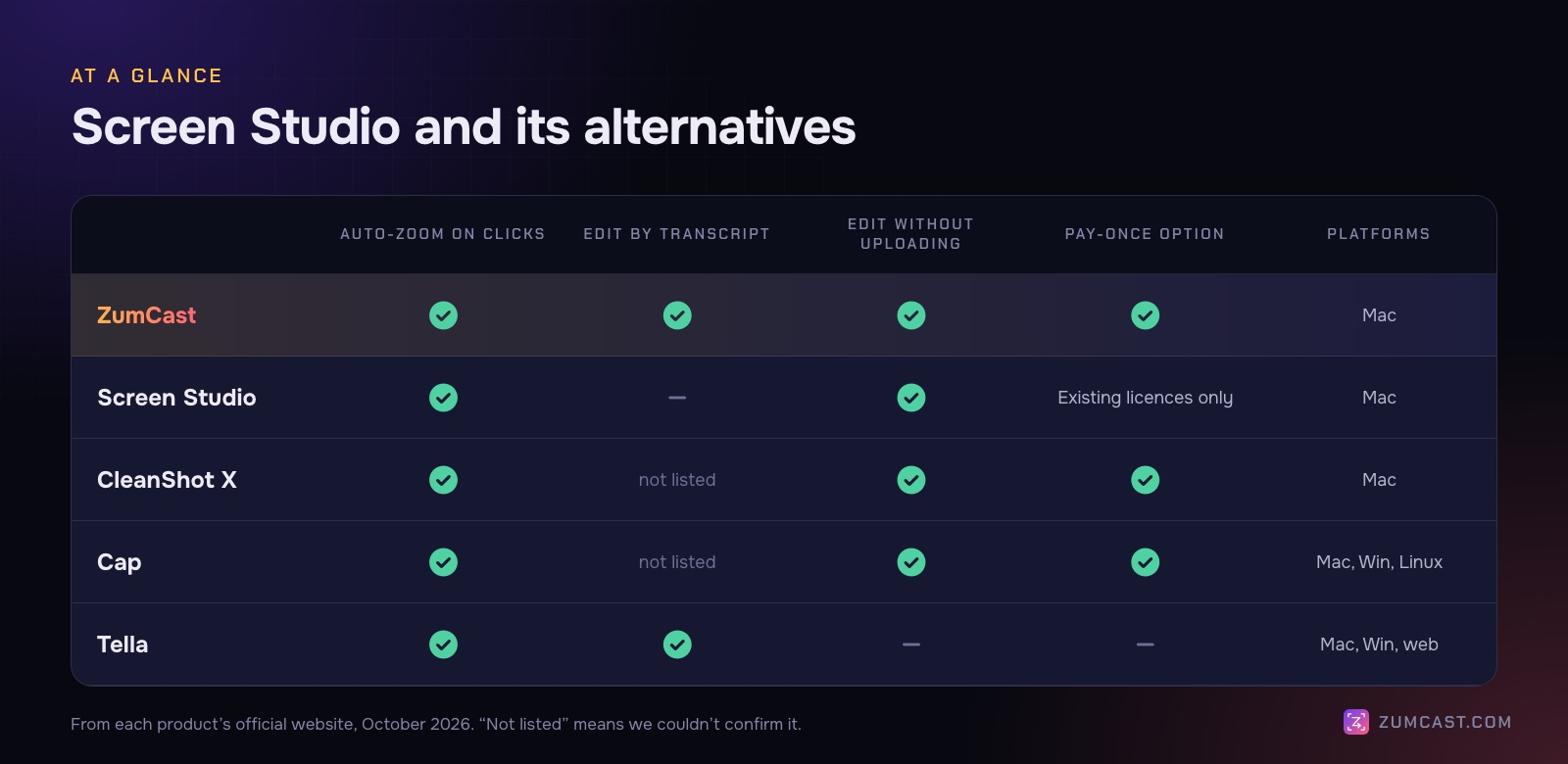
Here are the alternatives that keep what people love about Screen Studio, automatic zooms and smooth cursors, and fix one or more of those.
Disclosure: we make ZumCast, one of the apps below. Every other product's price and features come from its official website, October 2026.
Quick picks
- Pay once, plus transcript editing, captions and guides: ZumCast
- Screenshots first, polished clips too: CleanShot X
- Open source and cross-platform: Cap
- Cloud editing and share pages: Tella
- Staying put: Screen Studio itself, if beautiful short clips are all you need
1. ZumCast: the closest match, without the subscription
Price: Basic free; Pro $49 once (launch pricing from $9). Mac only, macOS 14 or later.
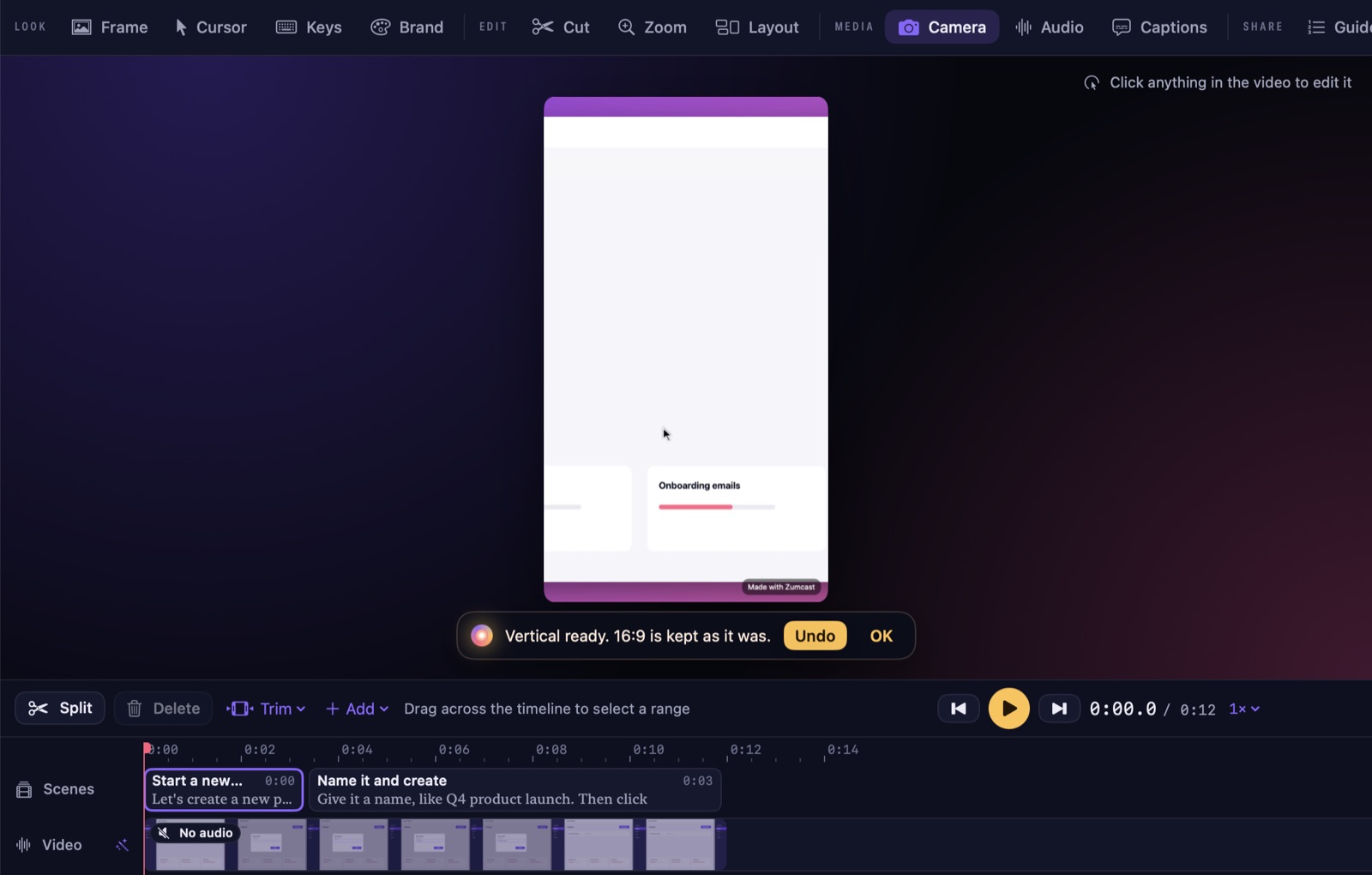
If Screen Studio's output is what you want, ZumCast is the closest like-for-like: when you stop recording, zooms on every click and a smooth cursor are already on the timeline. You can choose how close zooms get (Roomy, Balanced or Tight), add 3D angles that lean into the click, change the cursor style and size, add click effects and show your keyboard shortcuts on screen.
Where it goes further than Screen Studio:
- An AI editor that runs on your Mac. Ask Zumi in plain words, "cut the pauses and make it vertical", "zoom in on the Save button", and see the plan before it applies.
- Edit by transcript. Delete words and the video cuts with them; remove fillers and pauses in one go.
- Captions, translated on your Mac into 16 languages, exported as SRT or VTT.
- Versions with their own crop: 16:9, 9:16, 1:1, 4:5 and 4:3 from one edit.
- Written guides and interactive demos from the same recording.
- Screenshots, including scrolling capture, with markup and 102 wallpapers.
- Automatic redaction of emails, API keys, card numbers and faces.
What you give up: ZumCast is new (1.0 shipped in October 2026). Free exports are limited (the first half of the video, up to 30 seconds, with a mark) until you buy Pro.
Pick it if you want Screen Studio-style polish plus editing, captions and guides, paid for once.
2. CleanShot X: screenshots first, polished clips too
Price: $35 once with a year of updates (renewal optional, $19 a year); Pro $10 per user per month billed yearly for unlimited cloud. Mac only.
CleanShot X started as the Mac's favourite screenshot tool, and its video editor now has smart zooms, cursor smoothing, motion blur, backgrounds and vertical export, plus video transcription.
What you gain: best-in-class screenshots (scrolling capture, annotations, pinning, OCR), cloud links, and a low one-time price.
What you give up: transcript editing and filler removal aren't among its listed features, and its video editing is lighter than a dedicated recorder's.
Pick it if most of your work is screenshots and you want good-looking clips now and then.
3. Cap: open source, on every platform
Price: free tier with the full studio editor; desktop licence $58 once or $29 a year; Pro $12 per user per month. Mac, Windows and Linux.
Cap's studio mode does auto-zoom on clicks and cursor smoothing, exports up to 4K60, and transcribes captions on your device in 19 languages. Its instant mode gives you a share link while you record, Loom-style.
What you gain: open source, cross-platform, and the option to use your own storage or host it yourself.
What you give up: check the licence terms if you'll use the free tier commercially. Its AI titles, summaries and chapters (Pro) run in the cloud.
Pick it if you want open source, or your team isn't all on Macs.
4. Tella: cloud editing and share pages
Price: from $13 per user per month billed yearly. No free plan. Mac and Windows recorders, edited in the browser.
Tella combines auto-zoom with transcript editing and filler and silence removal, and publishes to polished share pages.
What you gain: transcript editing, AI titles and chapters, custom domains on Premium.
What you give up: recordings are uploaded to edit, AI features use credits, and it's still a subscription.
Pick it if you're happy in the cloud and want editing plus nice share pages.
What three years really costs
Monthly prices hide the real difference. Here's what one person pays over three years at list prices:
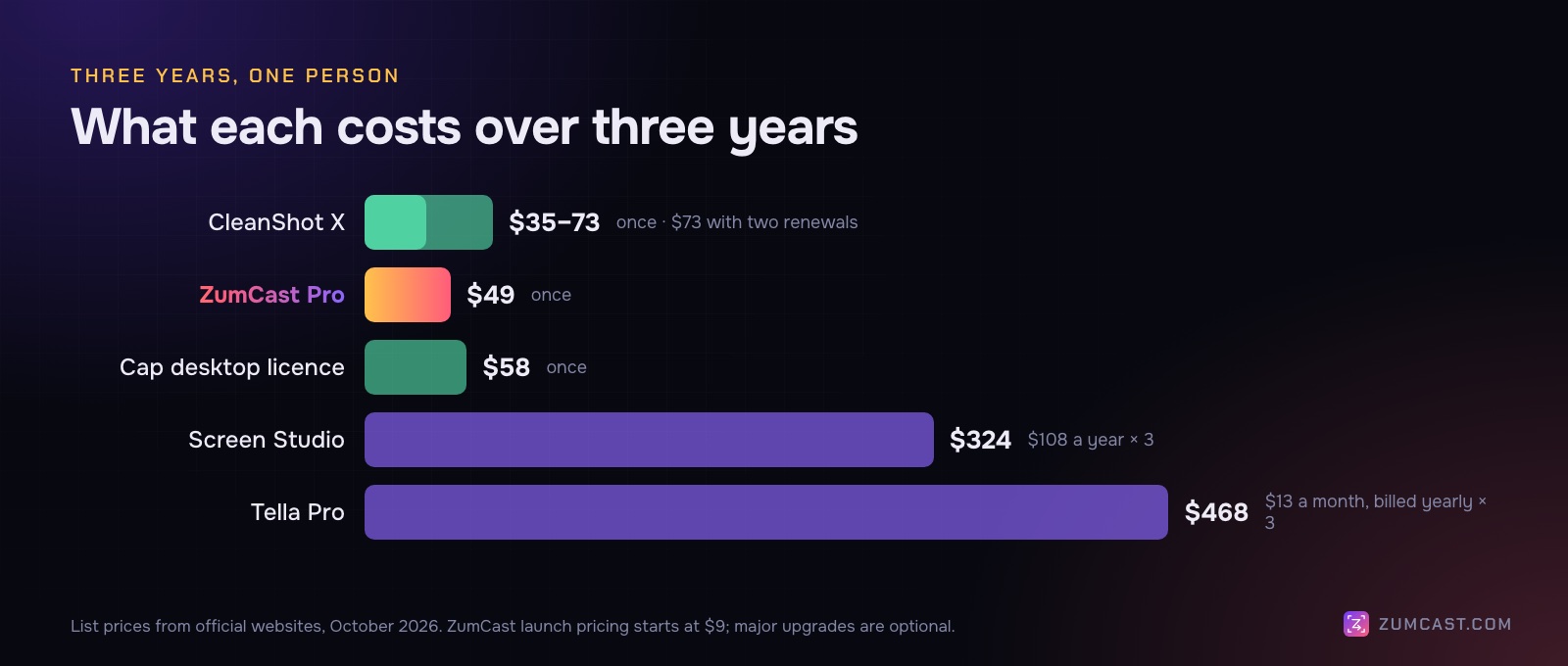
- ZumCast Pro: $49 once (major upgrades optional at $9 a year).
- CleanShot X: $35, or $73 if you renew updates for two more years.
- Cap desktop licence: $58 once.
- Screen Studio: $324 ($108 a year).
- Tella Pro: $468 ($13 a month, billed yearly).
Should you switch?
Stay with Screen Studio if you already have a one-time licence, you only make short polished clips, and you don't need captions, transcript editing or docs. It's excellent at that.
Switch if you're about to start or renew a subscription, you need transcript editing or captions, you also make tutorials and written guides, or you want screenshots in the same app. Every alternative above has a free tier or a free version; record the same 30-second demo in two of them and compare the exports.
FAQ
Is Screen Studio a one-time purchase? Not for new buyers. As of October 2026 it's $29 a month or $108 a year. Existing one-time licences can still be renewed.
What's the best free alternative to Screen Studio? Cap's free tier includes its studio editor with auto-zoom. ZumCast Basic adds zooms automatically and lets you edit without limits, but its exports are limited until you buy Pro.
Which Screen Studio alternative has auto-zoom? All four here: ZumCast, CleanShot X, Cap and Tella.
Is there a Screen Studio alternative for Windows? Cap and Tella both run on Windows. ZumCast, CleanShot X and Screen Studio are Mac only.
Which alternative keeps my recordings on my Mac? ZumCast, CleanShot X and Cap edit locally. ZumCast also runs its AI editing, transcripts and captions on your Mac. Tella uploads recordings to edit them.
How do the others compare more broadly? We compared eleven Mac screen recorders, including Loom, Camtasia and OBS, in The Best Screen Recorders for Mac in 2026.
Prices and features were checked on each product's official website in October 2026 and may have changed since. Screen Studio is a trademark of its owner; this article isn't affiliated with or endorsed by it. ZumCast is made by the team that wrote this article. Download ZumCast free.